

Learn about UTM parameters, best practices for using them, and how GoodMetrics makes it easy to track your campaigns.
UTM parameters are tags added to the end of a URL to help you track where your website traffic is coming from. They make it easy to see which marketing efforts are driving visitors, conversions, and revenue in your reports.
Here’s what they are and how you can use them in GoodMetrics.
The five UTM parameters
Section titled “The five UTM parameters”| Parameter | Identifies | Example |
|---|---|---|
utm_source | Traffic source (search engine, newsletter, platform) | google, newsletter |
utm_medium | Marketing medium (cpc, email, social) | cpc, email |
utm_campaign | Campaign name | spring_sale |
utm_term | Paid search keywords | yoga+shorts |
utm_content | Ad or link variant | carousel, header_link |
utm_source and utm_medium are required. The others are optional for more granular tracking.
How GoodMetrics handles UTM parameters
Section titled “How GoodMetrics handles UTM parameters”GoodMetrics automatically captures UTM parameters whenever they’re present in a link to your site.
In your Acquisition reports, you can break down traffic and conversions by source and medium, as well as by campaign, term, or content when those parameters are included.
This makes it easy to see which marketing efforts drive the most traffic and conversions — without any extra setup.
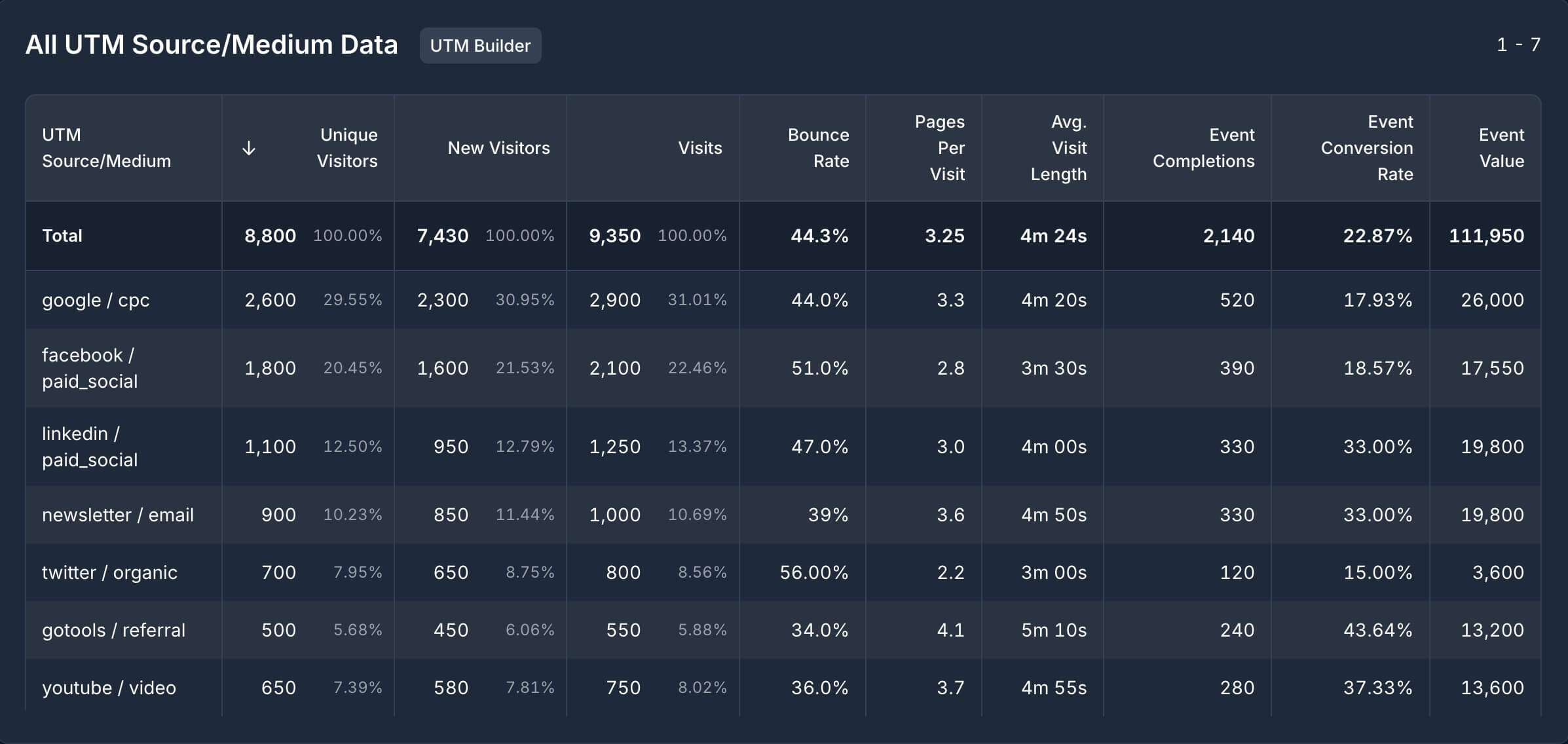
Here’s an example of how UTM Source/Medium data appears in GoodMetrics:
How to add UTM parameters to a URL
Section titled “How to add UTM parameters to a URL”Use our UTM Builder to create UTM links. It ensures your parameters are formatted correctly and helps maintain consistency across campaigns.
- Enter the URL, source, medium, and any optional parameters.
- Copy the generated link and use it in your campaigns.
UTM parameter best practices
Section titled “UTM parameter best practices”For comprehensive best practices, common mistakes to avoid, and when to use each parameter, see our UTM Parameters Glossary.
Quick tips:
- Use lowercase and underscores (not spaces)
- Always include
utm_sourceandutm_medium - Never use UTM parameters on internal links (it breaks session tracking)
- Keep values short and descriptive